A video editor’s two hardest problems, tried by hand.
Finding the shot, then editing it together, in a rebuild of Cardboard.
- Question
- Cardboard lists ten hard problems ↗ it has to solve to build the video editor it wants. What would I try for two of them?
- The two
- 03 Multimodal understanding: finding one moment inside hours of video. 02 Collaboration: several people, and an AI agent, editing the same video at once.
- Approach
- Rebuild Cardboard’s editor, then try each idea inside it as a short scripted run you can watch or take over. Seventeen runs in all.
- Built on
- A rebuild of the Cardboard 1.3.2 editor, made from its own design tokens and screenshots of the Mac app. Concept work, not affiliated with Cardboard.
- Footage
- Real clips and portraits from Mixkit, used under its free licence. Credits ↗
- Rebuild
- Open the editor on its own ↗
Cardboard is a video editor that runs in a web browser, with AI built in. The team has published a list of ten hard problems they need to solve to build it. They’re open questions, not features waiting to ship, which made them a good place to start an exploration.
I picked two. They sit at either end of a normal editing session. First you’re alone with hours of footage, looking for the three seconds you need. Then other people join, and you finish the edit together. So this page follows one session from start to finish, and the seventeen experiments sit along the way.
Both halves arrived at the same place: a system people can trust shows its reasoning. In search, every result says why it’s there. When editing together, every colour belongs to a person, so you can always see who did what.
A video editor, in one minute.
If you’ve never used a video editor, this is all you need for the rest of the page.
- Footage
- The raw video files from a shoot. One day of filming can be hundreds of gigabytes, far more than a laptop can upload quickly.
- Clip
- One video file, or a piece of one.
- Library
- The panel that lists every clip in the project.
- Timeline
- The strip along the bottom where clips are placed in order. Read left to right, it’s the finished video.
- Playhead
- The line on the timeline that marks the moment you’re looking at.
- Agent
- An AI assistant inside the editor. You ask it for a change in plain words and it makes the edit.
Why video is hard for computers
Text can be searched because it’s stored as words. Video is stored as pictures and sound, so a computer has to watch it with an AI model before it can say what’s in it. Watching hours of footage takes time and money. That’s the root of the first problem.
The second comes from size. A document is a few kilobytes. A project’s footage can be hundreds of gigabytes, and it sits on each person’s own computer. Keeping several people in step over that much material is a different job from sharing a document.
Rebuild the editor, then try ideas inside it.
I didn’t want to judge ideas on slides. An idea about search only proves itself when you can watch the results move as you type. So the first step was rebuilding Cardboard’s editor from its own design tokens and screenshots of the Mac app, with real footage in it.
Then every idea became a run: a short scripted scene in that editor. A yellow cursor plays you, and a bubble beside it says what’s happening. Here each run plays straight through, and Replay starts it again. To pause, skim or take over, open it with Try it yourself ↗, which opens the full prototype.
Each run has three notes. What happens describes the scene. Watch for says where to look. Caveat says where the idea falls short, because every one of them does somewhere.
Finding the shot.
Cardboard puts it simply: there is no Ctrl+F for video. Finding the right clip in a large library depends on AI models that are either too slow or too inaccurate to use in the middle of an edit (problem 03 ↗).
The usual fix is to upload all the footage to a server, have a large model watch every second of it, and search what it wrote down. That works, but it’s slow to set up and expensive to run, and inside an editor search has to feel instant. So I started from what makes this hard, not from a model, and tried one idea for each difficulty.
One small piece of interface runs through all four: a label on each result that says why it’s there.
- Said
- The words were spoken in the clip, so they’re in its transcript.
- Seen
- It looks like what you described, according to an AI model that has watched the frames.
- Lingered
- You kept going back to it while editing.
- Fits
- It matches the shots either side of where it would go: colour, pace, history.
Read the footage where it already is.
Running in a browser sounds like a limit. For search it’s an advantage: the laptop that holds the footage also has a graphics chip (a GPU), and modern browsers can use it through WebGPU. A small AI model can watch the footage right there.
What leaves the laptop isn’t video. It’s a fingerprint for each sampled frame: a short list of numbers, about a kilobyte, describing what the frame looks like. That’s enough to search with but not enough to play. Footage uploaded: 0 B.
01 / 17On the laptop
Drop & sort.
- What happens
- A 137 GB folder from Tuesday’s shoot lands in the Library, and no upload bar appears. Each card starts grey and fills with colour as a sweep passes over it. Meanwhile the pointer sorts drones and the interview into bins, and hovers the welder clip so it’s read next.
- Watch for
- The meter under the Library: Footage uploaded stays at 0 B while Fingerprints sent climbs in kilobytes. The ticks under each card are sampled frames, and they bunch wherever the clip moves.
- Caveat
- Reading speed is staged. An M-series laptop would read faster than this. A machine without WebGPU needs a server fallback, which isn’t designed here.
02 / 17Partly read
Search mid-index.
- What happens
- Seven of twelve clips have been read when “drone over water at sunset” is searched. Results come only from read clips, and the five unread ones are listed under them rather than hidden. Read these next moves them to the front of the queue, and when Drone_coastline_02 finishes it goes straight to the top.
- Watch for
- The list re-ranks in place, with rows sliding to their new positions and a New tag on the arrival. Nobody has to search twice.
- Caveat
- A result that jumps above the one you were about to click is a real hazard. A shipped version should hold positions while the pointer is over the list.
03 / 17Battery and teammates
On battery.
- What happens
- Unplugging pauses indexing, with an offer to carry on slowly. Then the view switches to Priya, a teammate on another laptop. She has fingerprints for every clip that’s been read but none of the footage. That’s enough to find the welder’s sparks but not to play them, so she asks for just the three seconds that matched.
- Watch for
- Priya’s cards are fingerprints: a strip of colours per sampled frame where the thumbnail would be.
- Caveat
- Fingerprints still carry information. A vector and a few colours per frame can reveal what a private clip shows, so they need the same permissions as the footage.
A quick guess, then a careful look.
Comparing your sentence against every frame in the library is the expensive part of AI search, and most of the time it isn’t needed. Usually the words you type were spoken in a clip or match a tag. A plain word index, like the one at the back of a book, finds those in about ten milliseconds and narrows ten hours of footage to a few seconds.
The AI model then looks at just those few seconds, and only once you stop typing. It feels like AI, but answers like a database. When the word index finds nothing, the panel says so and offers a slower, full search.
04 / 17Two passes
One keystroke.
- What happens
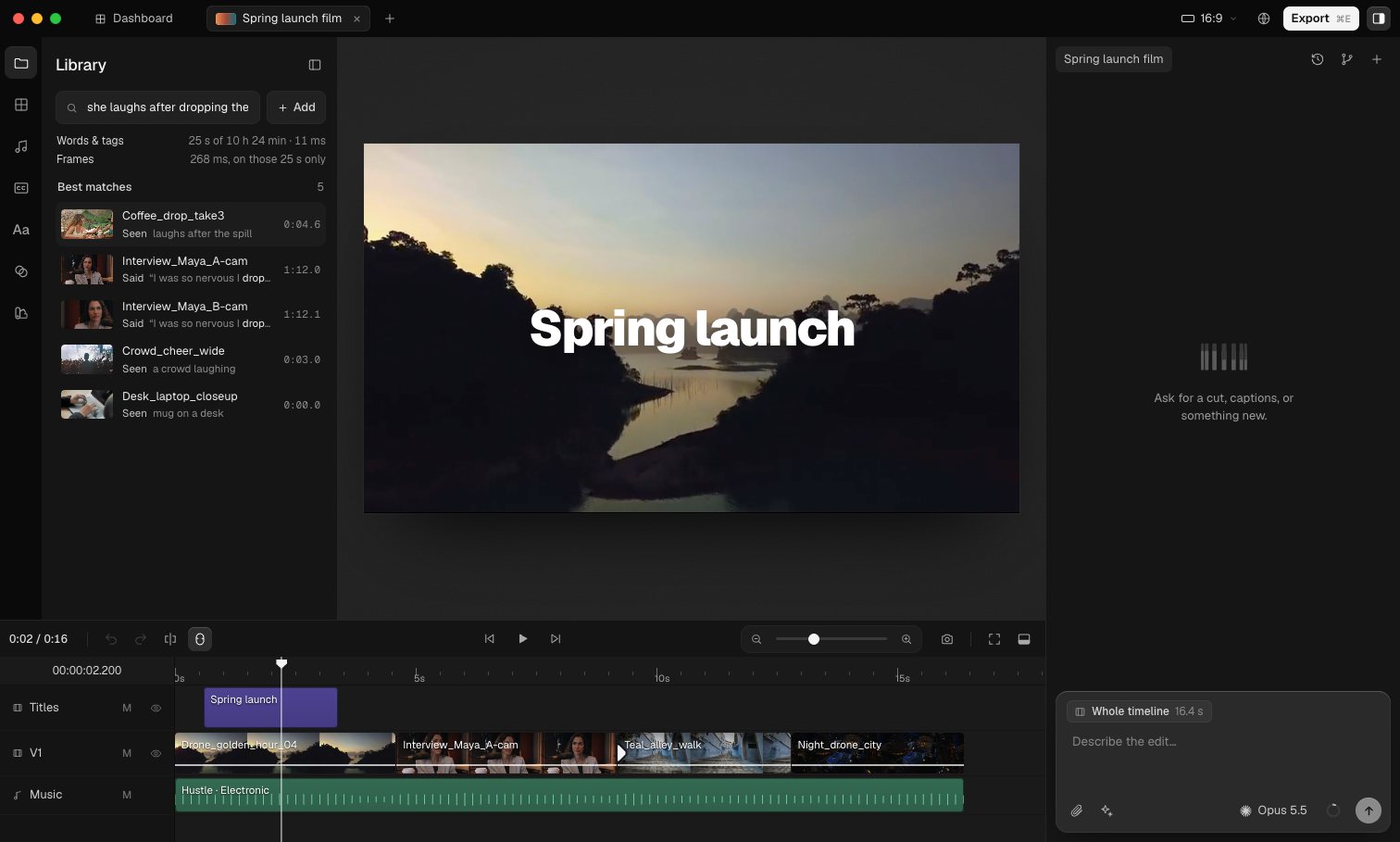
- ⌘F, then “she laughs after dropping the coffee”. Stage 1 updates with every word, shrinking 10 h 24 min to 25 seconds across five spans. When typing pauses, stage 2 scans the frames of just those spans and the list settles. Coffee_drop_take3 matched only a tag and an audio event, but it has the strongest picture, so it moves above the interview that says the right words.
- Watch for
- The two quiet lines above the results. Words & tags updates as you type, with how much of the footage it kept and how long that took. Frames waits for the pause. The list re-ranks once and then stays still.
- Caveat
- The stage 2 delay is staged at about a second so the scan can be seen. The label shows the real budget. Scores are scripted, so the interest is in how judging is laid out, not in the judging.
05 / 17Fallback
The miss.
- What happens
- “close-up of hands”: nobody says it and no tag covers it, so stage 1 finds nothing and stage 2 has nothing to rank. The panel says that plainly and offers Look deeper, which reads every frame with progress shown and results arriving as they’re found. What it finds is saved as tags, so asking “hands typing” straight after is instant.
- Watch for
- The Frames line says there’s nothing to compare on the miss. After the deep read, the new results are labelled Tag · “…, learned”, and a note says they were saved as tags. The cascade’s blind spot gets smaller each time it’s hit.
- Caveat
- Learned tags are only as good as the query that made them. A careless deep search can leave a misleading tag behind, so tags need a way to be removed.
06 / 17Word timing
Exact span.
- What happens
- Search for a line Maya says, “the first version is supposed to be rough”. Stage 1 matches it word for word in both cameras, and stage 2 prefers the A-cam framing. Clicking the result opens the match as a span under the viewer, with in and out sitting on the words. The out point is dragged to leave a breath, and Enter cuts exactly 2.3 seconds in at the playhead.
- Watch for
- The word lane under the viewer: each word sits at its own timestamp, and the selection snaps to them. The clip that lands on the timeline is the span, not the 2-minute take.
- Caveat
- Word-level timing is solid for speech. For visual moments like “she laughs” the span edges are softer, and the handles should show that uncertainty, which isn’t designed here.
The edit remembers where you looked.
An AI model can say a clip shows a woman talking. It can’t say which three seconds of a two-minute take you care about. But you already show it, by replaying a moment, slowing down over it, or pausing on one frame. An editor does this hundreds of times a day.
So that attention becomes heat: a glow on the parts of a clip you kept coming back to. Heat helps rank search results, and trims them to the part that mattered. Because it comes from watching someone work, it’s also the idea that most needs to be visible and easy to switch off.
07 / 17Attention
Heat.
- What happens
- The interview opens in the source scrubber under the viewer. A quick skim of the whole take leaves only a faint trace. Then the pointer loops 0:42–0:45 three times and pauses on one frame, and heat builds up under the head. Afterwards the heat appears on the clip’s Library card and on the timeline clip that uses that part of the source.
- Watch for
- The Learning dot in the scrubber’s corner, so recording is never silent. The loop bracket and the pin show why the heat is where it is.
- Caveat
- Dwell is a rough proxy. People also slow down over a span because something is wrong with it, like a focus buzz or a boom in shot, and heat can’t tell that apart from interest.
08 / 17Ranking
Pre-trimmed.
- What happens
- Heat from earlier sessions sits on four clips. “strong reaction” first ranks by the picture alone, and the interview comes back as the whole 2-minute take. Switching on Use where I lingered re-ranks once: the interview moves to the top, trimmed to the few seconds that were looped. One click puts exactly that span on the timeline.
- Watch for
- The number on each result is the length you’d get. With the switch off, the interview is the whole 2:14 take. With it on, it’s the few seconds you kept going back to, and its label changes from Seen to Lingered with the span.
- Caveat
- Ranking by past attention can turn into a loop: clips that were looked at get found, so they get looked at more. Unwatched footage needs a way to surface, which this doesn’t solve.
09 / 17Consent
Just checking.
- What happens
- A focus check before export: three clips scrubbed start to end at one speed. That pattern looks like checking, not interest, so its heat is held back as unconfirmed, drawn dashed and cool. The editor is asked once and says don’t learn from it. Then one clip’s heat is forgotten from its card menu, and learning is switched off for the project.
- Watch for
- Unconfirmed heat is drawn striped and doesn’t count until it’s confirmed. When learning is off, existing heat dims but stays, so switching it back on doesn’t lose anything.
- Caveat
- “Same speed, no loops” is a guess. Asking once per pattern is better than guessing silently, but an editor who checks footage daily will get tired of the question.
Shots that fit between two others.
Most AI search answers “what looks like this sentence?”. An editor is often asking something else: what fits here, between this shot and that one. That depends on things a single description can’t hold. Do the colours match? Was it filmed the same day? Have these shots been placed together before? Does the pace agree?
So each clip becomes a point, and those relationships become labelled links between points. Together they form a graph. With Fit to playhead on, half of a shot’s score is how well it matches your words, and half is how strongly it links to the shots either side of the gap.
10 / 17Context
Fit to playhead.
- What happens
- There’s a gap on the timeline between a golden-hour drone shot and a teal street. Searching “upbeat cinematic drone shot” puts the noon beach first, and in the triptych under the viewer it’s marked Clashes: hard midday light between two soft grades. Turning on Fit to playhead opens the graph over the viewer and re-ranks. Drone_coastline_02 wins: warm sky like the shot before, teal water like the shot after, the same shoot day, and cut next to Teal_alley in Teaser v1. Use flies it into the gap.
- Watch for
- The graph reads top to bottom: the cut along the top, the candidates ranked below. The winner’s links to both neighbours are drawn in blue, and its reasons sit in one stack per side. The line under the graph adds the score up: how it looks, plus each reason.
- Caveat
- Edge weights are hand-set here. In practice they’d be learned from which suggestions editors accept, and that brings back the feedback-loop worry from idea 03.
11 / 17Reasons you can switch off
Cut an edge.
- What happens
- With the graph open, edge types are switched off one at a time. Without Palette, Night_drone_city nearly ties with the coastline. Without Cut together, the coastline only wins on shoot day and pace. Without Shoot day, only pace is left, every drone shot is paced alike, and the noon beach is back on top. Reset brings it all back.
- Watch for
- Each reason type that goes off thins or removes its links, and the score line under the graph drops that term. The ranking reorders to match. The order is always the sum of what’s visible.
- Caveat
- Turning off a whole type is coarse. Sometimes the useful thing is to say one particular edge is wrong (“we never cut those two together on purpose”), which isn’t designed here.
12 / 17New project
Cold start.
- What happens
- A new project, Product teaser v2, with nothing cut yet. Fit to playhead only has content edges, palette and pace, and four shots land within a few points of each other. Switching scope to Your library brings in habits from other projects: Drone_coastline_02 followed a warm opener twice in Spring launch film. Once it’s used, that borrowed edge becomes this project’s own.
- Watch for
- Borrowed edges are dashed and name the project they came from. After the cut, the label changes to “this project”.
- Caveat
- Borrowing habits also borrows clichés. A team that always opens on a drone shot will keep being told to. The scope switch makes that choice visible, but it doesn’t make the choice for you.
One search, four reasons.
The four ideas aren’t alternatives. Each fixes a different part of the problem. Reading on the laptop makes search possible without uploading. Two passes make it fast. Heat makes it personal. The graph makes it fit the edit. The last search run uses all four, and every result shows which ideas lifted it.
- 01 On this Mac
- New footage is read on the laptop during the search, and joins the list when it’s ready.
- 02 Words → frames
- Words and tags on every keystroke. Frames only for what they kept.
- 03 Use where I lingered
- Lifts and trims what you kept going back to.
- 04 Fit to playhead
- Prefers what belongs between the shots around the gap.
13 / 17Four ideas together
All four.
- What happens
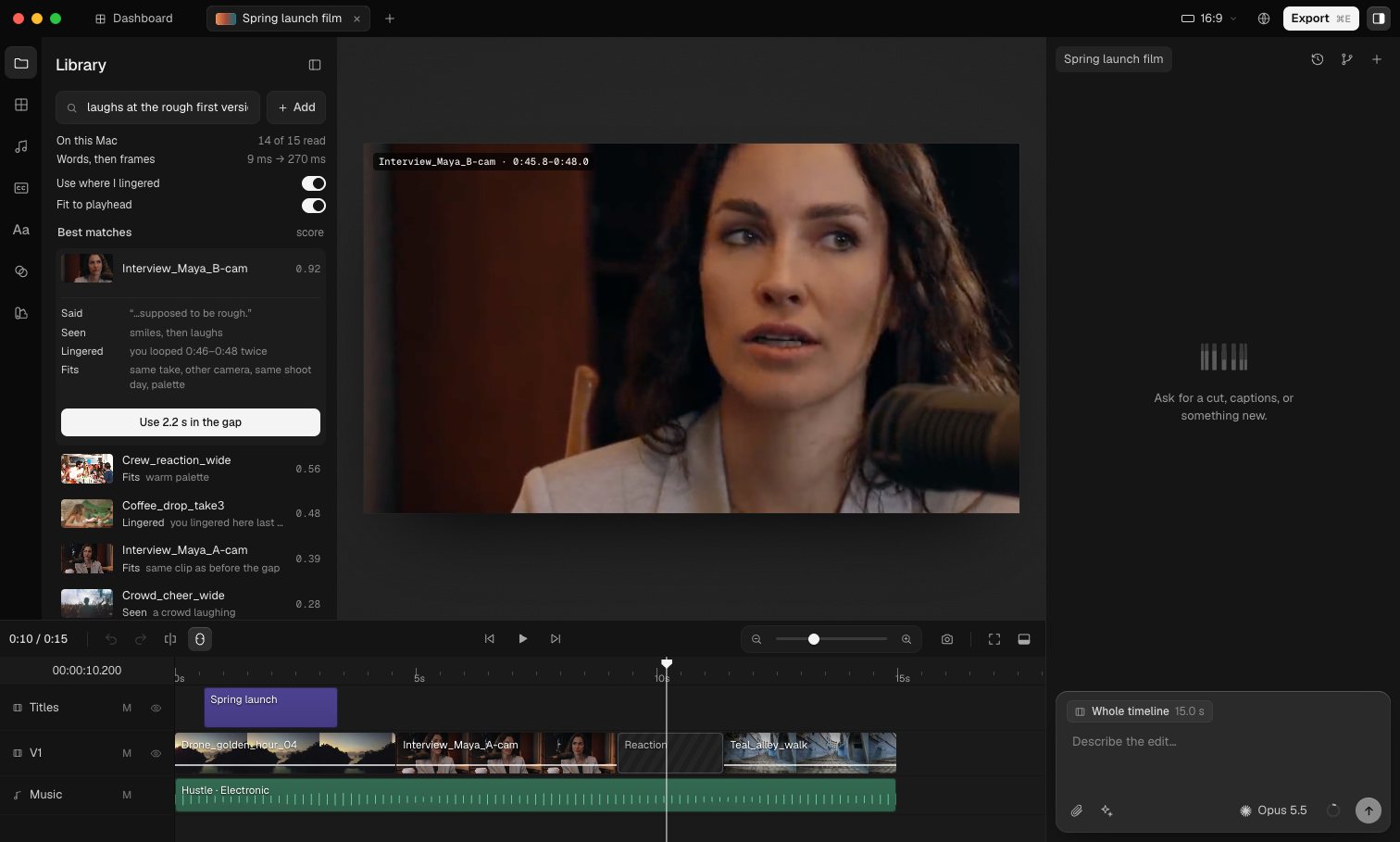
- Wednesday’s pickups are dropped in and start being read on the Mac. There’s a gap after Maya says “the first version is supposed to be rough”, so the search is “laughs at the rough first version”. Words put the A-cam line first, and frames put B-cam’s smile first. A pickup, Crew_reaction_wide, finishes reading and lands at #2. Use where I lingered trims B-cam to the two seconds that were looped, and briefly lets the coffee clip overtake the pickup. Fit to playhead settles it: same take, same day, same palette. The 2.2-second span goes in the gap.
- Watch for
- Two quiet lines above the results show the words pass and the frames pass, and two switches add Use where I lingered and Fit to playhead. The top result lists its evidence, one line per idea: Said (or Tag), Seen, Lingered and Fits.
- Caveat
- Four signals means four ways to be wrong, and they can disagree. Here they agree because the scene is scripted. A real version needs a way to say which signal to trust for this search, and the two switches are only the start of that.
Then someone else opens the project.
Finding a shot is something you do alone. But by the time it’s on the timeline, the producer wants to move the title, the sound designer is lowering the music, and someone has asked the agent for a shorter version.
The same thing that made search hard makes this harder. The footage is huge, and it’s spread across everyone’s laptops.
Editing together.
Cardboard’s framing: editing together is solved for text, in Google Docs, and for design, in Figma. Video is different. A project isn’t just a document. It’s a timeline, playback, renders still in progress, and footage that may not even be on every person’s computer (problem 02 ↗).
The question I set myself: how can three people and an agent edit the same video at once, without locking each other out or losing anyone’s work?
Where it started
My first idea was to lock the part of the timeline someone is working on, and unlock it when they go quiet. Walking through it showed where that breaks for video:
- Edits shift things. Shorten one clip and everything after it moves, so a lock on “0:20 to 0:30” ends up covering the wrong footage.
- A timer can’t tell someone thinking, or watching playback, from someone who has left.
- The agent’s edits touch every shot at once, so it would collide with every lock.
- Someone coming back to an expired lock runs into whoever took over.
So I swapped locks for five smaller ideas, each answering one of those failures.
Colour belongs to people.
The editor’s interface stays grey. Colour only appears on things that belong to someone: their cursor, a label that types what they’re doing, the band over the stretch they’re working on, and their avatar. A name always comes with the colour, so nothing depends on colour alone.
 Sam
Sam- You, the producer. The yellow cursor and the narration bubble.
 Priya
Priya- The editor. Usually holds a claim somewhere on the timeline.
 Theo
Theo- Sound. Levels, music and generated effects.
- Agent
- Works on drafts, never on the live timeline. White, because it’s the app itself.
14 / 17Intent and proxies
Join mid-edit.
- What happens
- You open the project from hotel Wi-Fi. Avatars fill in, and the footage arrives blurred, then sharpens as each proxy lands. You move the title. Then Priya trims the opener while Theo pulls the interview down 3 dB, at the same moment, on the same stretch.
- Watch for
- Theo’s cursor rides the clip as Priya’s trim slides it 2 s left, and a dashed trace marks where it was, labelled −2.0 s · Priya. Then ⌘Z takes back only your title move.
- Caveat
- Intent-based merging is easy for trims, moves and levels. Two people trimming the same edge still needs a rule (last writer wins, with a trace), which this run doesn’t show.
15 / 17Presence
Soft claim.
- What happens
- Priya’s name sits in coral over the last two shots: her claim. You drag a better shot onto her night drone. Before you let go, the drop says Suggest to Priya instead of Replace, and it lands as a dashed suggestion on her clip. Priya opens it and swaps it in. Later she steps away and her claim turns grey.
- Watch for
- Nothing is ever blocked. The claim changes what a drop means, and it fades to “Priya · 2m ago” instead of expiring under her.
- Caveat
- Claims are inferred from where someone edits. Someone who only watches a stretch closely doesn’t claim it, and maybe should be able to.
16 / 17Draft and review
Agent on a draft.
- What happens
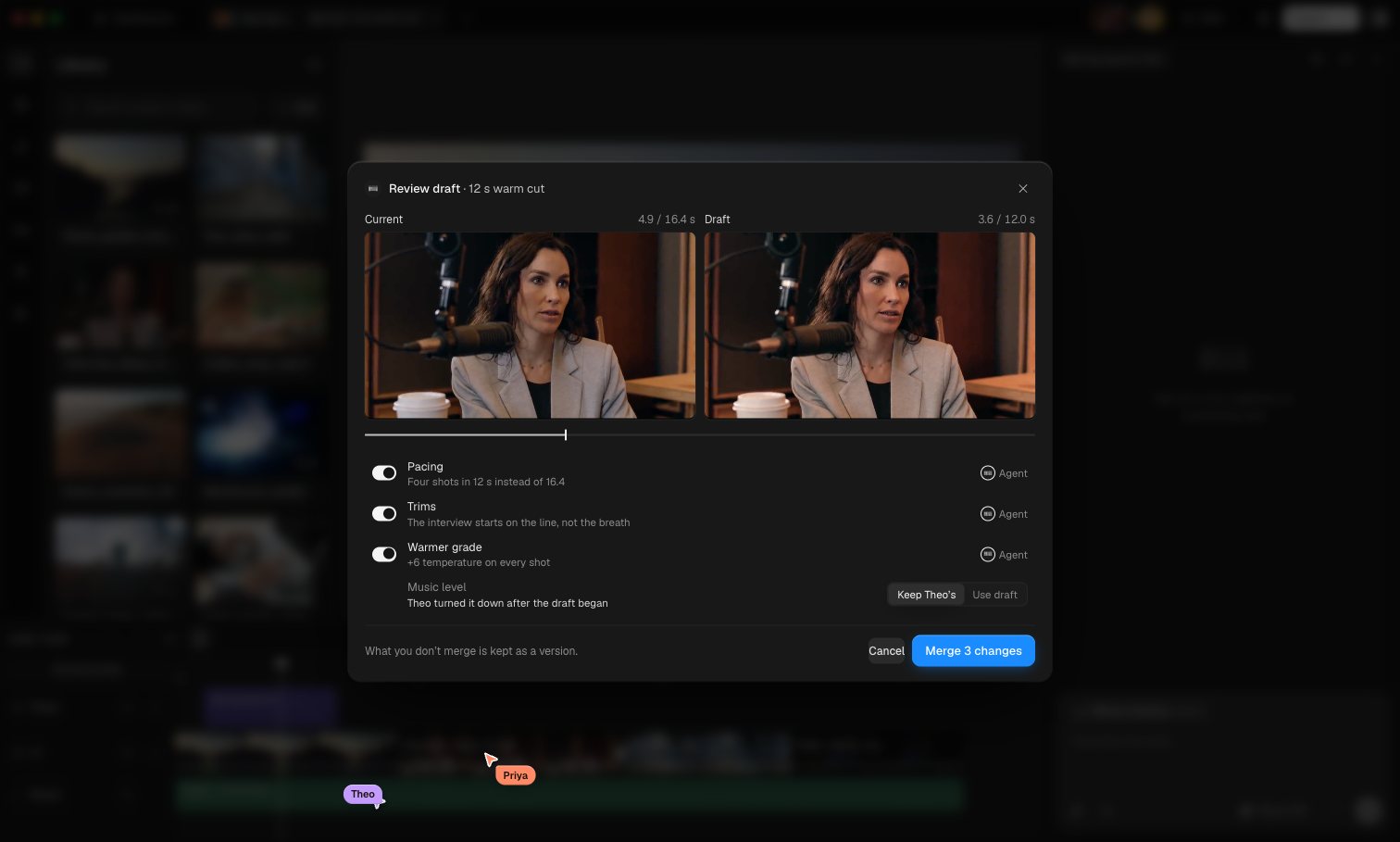
- Nothing is selected, so the scope chip above the prompt says Whole timeline: that’s what “it” means. You ask for “12 s and warmer”. The agent’s avatar starts turning and a draft chip appears on the tab. The shared timeline doesn’t move, and Theo turns the music down meanwhile. The draft returns as a decision card, and Review opens a modal with the editor blurred behind it: current and draft playing in sync, and a switch for each change.
- Watch for
- The music row is flagged: Theo changed it after the draft began, so it defaults to Keep Theo’s. You switch the grade off and merge the rest, and the modal closes. What you skipped waits in Versions, a small tree beside the chat history, where one button brings the grade back.
- Caveat
- Watching two previews takes as long as the cut. A long film would need the review to jump to the changed spans rather than play everything.
17 / 17The one lock
Generating.
- What happens
- Theo drags across an empty stretch of the audio lane and presses G. A prompt opens right on the timeline, sized to the stretch, and you watch “Whoosh into the night shot” typed live. Enter turns it into a striped, locked block: “Generating · Theo”. You try to drag your Impact onto it. The cursor shows no-entry, the block says Locked · about 40 s, and the clip springs back. Theo’s Wi-Fi drops, but the job carries on and the whoosh lands. Then Priya’s room tone fails, and you remove it yourself.
- Watch for
- The block’s label changes to “started by Theo” when Theo goes offline. The lock belongs to the job, so it outlives the person and ends with the work.
- Caveat
- A job that hangs without failing would hold its lock indefinitely. It needs a timeout that turns into the same Retry · Remove state.
Two problems, and five more along the way.
I picked two problems from the list, but working on them kept running into others. This is where each run touched Cardboard’s ten. Three weren’t touched at all, and they mark the edge of this work.
- 0101–0314
A fast editor in the browser
Smooth, frame-accurate editing inside a web page.
Reading footage on the laptop’s GPU, and joining an edit on proxies.
- 0214–17
CollaborationPicked
Several people editing one video at once.
- 0301–13
Multimodal understandingPicked
Finding a moment by what’s said, shown or heard.
- 0410–1216
Better context
Giving the agent what it needs to know about the edit.
Search that knows what’s around the playhead, and a chip that shows what “it” refers to.
- 0507–08
Predicting next actions
Guessing your next step, like autocomplete for editing.
Heat guesses which part of a clip you’ll want, and trims to it.
- 06Not touched
Style references
Borrowing the look of another video.
- 07Not touched
Motion graphics
Making animated titles and graphics.
- 0807–0912
Memory
Learning a creator’s habits over time.
Habits you can see and forget, and habits borrowed from other projects.
- 09Not touched
Verification
Checking an edit is good, like spell-check for video.
- 1016
Version control
Branching and merging edits, like git for video.
The agent’s draft is a branch, reviewed side by side before it merges.
What I’d take forward.
The system’s design is the interface. Each technical choice here turned into something you can see: a sweep across a clip as it’s read, a list that reorders once, a glow where you lingered, a link between two shots, a name over a stretch of timeline. Being able to see them is what makes them trustworthy.
From search, I’d keep the why label. It’s cheap to show, it explains the order without a paragraph, and it gives you something to disagree with.
From editing together, I’d keep the claim. It’s one line on the timeline, it turns an accidental overwrite into a suggestion, and it never blocks anyone.
Still open
- When the picture says one thing and your habits say another, which should win?
- In a team, whose heat counts, and whose habits get borrowed?
- Two people trimming the same edge in the same second.
- Reviewing a long draft without watching it all twice.
- Reconnecting after hours offline, with dozens of edits waiting.
Cardboard’s full list is worth reading: ten hard problems ↗. These were two of them, tried by hand.